· 9 min read
Conversational Infra as Code
What if you could vibe code & engineer your serverless solutions on AWS using dedicated MCP Servers? Just give AI agents access to your AWS accounts. What could possibly go wrong?

From Template to Dialogue
Infrastructure used to be declared, then coded, then generated. Now it can be simply discussed.
We have a lot of ways to define Infrastructure as Code. Initially we used (and still use) declarative frameworks: static templates to declare our virtual resources Looking at the templates, what you see is what you get with 1:1 relation between definition of the resource and the resource itself defined on the target platform. AWS CloudFormation, AWS Serverless Application Model (SAM), Serverless Framework, Terraform, OpenTofu, to name a few here.
Programmatic frameworks were a game changer. Just use a scripting languages to write a code which generates the declarative templates for you: Troposphere, AWS CDK, Pulumi, SST to name a few. Then came the era of Generative AI and AI-assisted IDEs. If you can develop on autopilot any code, why not Infra as Code? Cursor, Amazon Q Developer, GitHub Copilot and many other tools are happy to produce the programmatic code or declarative templates at the ultrasonic speed.
What’s next then? Welcome to era of conversational IaC: define an AI agent, give it some context and instructions, plug in some tools, then convince it to develop & deploy stuff for you. From a dialogue (sometimes a monologue to your stubborn robot), to deployment.
Model Context Protocol
First, let’s start with the basics. Model Context Protocol (MCP) is an open-source standard for connecting AI applications to external systems. It has been introduced by Anthropic (company behind Claude models) in Nov 2024, and recently donated to the Linux Foundation. By using MCP the AI applications can connect to data sources, tools and workflow. This can enable them to access key information and perform various tasks.
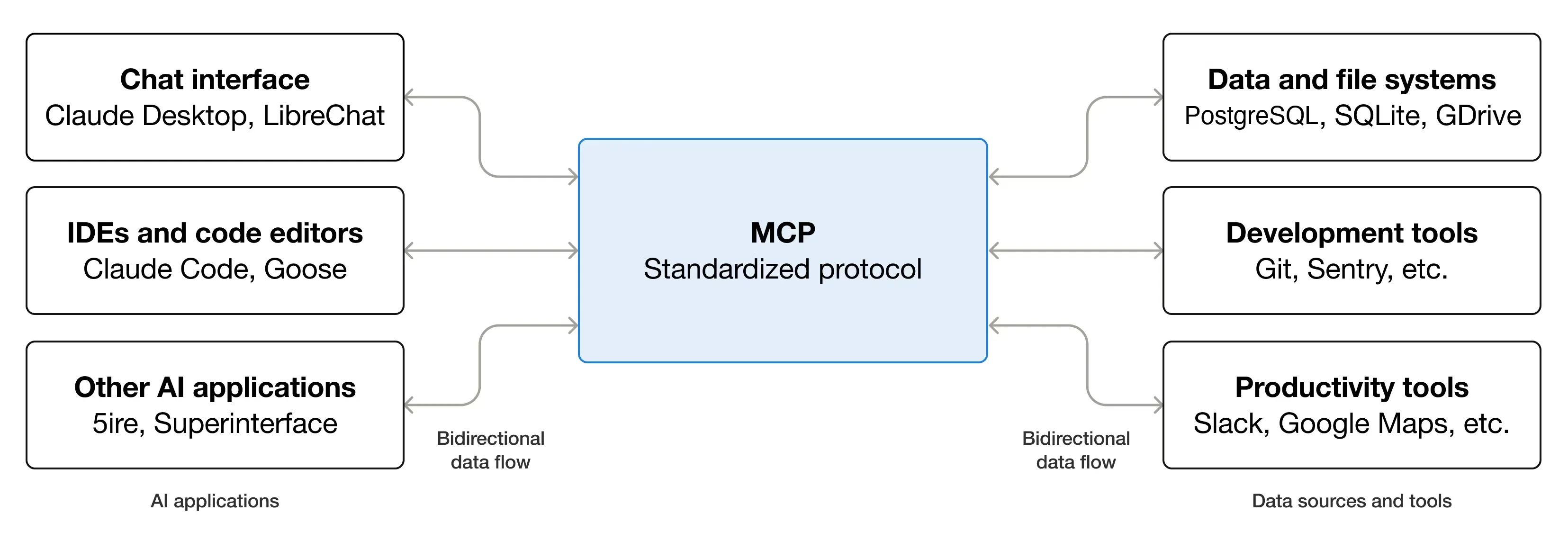
Think of MCP like USB-C ports for AI applications. MCP follows a client-server architecture, where key participants are:
- MCP Host is an AI application (IDE/CLI) that establishes connections to one or more MCP servers
- MCP Servers are programs that expose specific capabilities to AI applications through standardized protocol interfaces
- MCP Clients are instantiated by host application to communicate with MCP servers, each client handles one direct communication with one server
Almost every modern IDE supports MCP and can be the MCP host: Visual Studio Code, Claude Desktop, Claude Code, Cursor, Kiro IDE, Kiro CLI, etc. In this post I will be using Kiro CLI with custom agent and AWS MCP Servers (local).
AWS MCP Servers
Every major platform and software vendor developed some MCP servers to expose their data & tools via this protocol. AWS, GCP, Azure, CloudFlare, GitHub, Spacelift and many others.
AWS open-sourced a bunch of them, 64 to be precise (as of Jan 2026). These are local MCP servers, designed for specific topics: documentation, infrastructure, cost & operations, etc. AWS has recently also released AWS MCP Server, a managed remote server providing AI assistants/agents secure, authenticated access to AWS services.
Why would we need AWS MCP Servers? They enhance the capabilities of foundation models (FMs) in several key ways:
- Improved output quality: significantly improve model responses for specialized domains like AWS services
- Access to latest documentation: FMs may not have knowledge of recent releases, APIs, or SDKs
- Workflow automation: convert common workflows into tools that foundation models can use directly (Terraform, CDK)
- Specialized domain knowledge: provide deep, contextual knowledge about AWS services
In my case I will be using the following MCP servers:
Kiro
Kiro is an agentic IDE & CLI developed and maintaned by AWS. Kiro works alongside you to turn prompts into detailed specs, then into working code, docs, and tests.
I will be using just Kiro CLI to run my agent configured with AWS MCP Servers and other tools.
Custom Agents
Custom agents allow you to define specific configurations for different use cases. The configuration file specifies which tools the agent can access, what permissions it has, and what context it should include. Custom agents work with both built-in tools and external tools provided through the Model Context Protocol (MCP).
Here is my custom agent configuration files:
I also use these custom prompts (text files), so I can call them out in Kiro CLI using simple keywords like: @build, @deploy:
Most IDE/CLI tools will have similar agent configuration:
- Local configuration stored in project’s root directory: project-specific configurations, agents with access to selected tools, and environments with unique requirements, sharing agent configurations via version control systems (GIT)
- Global configuration stored in your user’s home directory: general-purpose agents across projects, personal productivity agents, agents without project-specific context, commonly used development workflows
One last thing I’m providing to the agent are the following Markdown files, as the context:
- AGENTS.md: this is becoming a standard format, think of it as README file for AI agents & coding assistants, more information: agents.md
- docs/PROJECT.md: this is context about the project itself, that it’s AWS CDK app in TypeScript, with some instructions which AWS CLI profile and region to use for authenticating and deploying to my AWS account
- docs/TASKS.md: this is list of actual tasks I’d like the agent to perform, step-by-step instructions what resources to add to my CDK stack, how to configure them, and how to test them.
Functionless Addess Book
Here’s an overview of a simple event-driven serverless backend (functionless as there are no Lambda functions involved), based on 3 services: Amazon EventBridge, Amazon DynamoDB, AWS Step Functions. A custom event emitted to custom event bus will trigger execution of a workflow, which will pass the content of the event as a new item in the DynamoDB table, which is my address book.

I will ask my agent to define the required resources in the AWS CDK stack, deploy these resources and troubleshoot any deployment issues (if any). Then I will ask the agent to generate some mock data for me and test my state machine and event rule.
Let’s Buid!
I can now start my cdk-buddy agent, and do some basic healthcheck to see if my MCP Servers, context, prompts have been loaded properly:
$ kiro-cli --agent cdk-buddy
[cdk-buddy] > /agent list
[cdk-buddy] > /mcp
[cdk-buddy] > /context show
[cdk-buddy] > /prompts list
Now I can simply provide the agent detailed instructions what I would like to add to my CDK stack, resource by resource. But I’ve already prepared all necessary tasks, with relatively specific configurations I would like. This is the content of my TASKS.md file.
[cdk-buddy] > Analyze TASKSThe agent is smart enough to figure out what I want, and categorized the tasks into deployment tasks and testing tasks. I can then simply tell it which task it should focus on. Every time it finishes one of the tasks, I can ask it to build it and deploy it.
Here is my conversation with the agent, based on the context and prompts I’ve provided it earlier:
[cdk-buddy] > Start with Task 1
[cdk-buddy] > @build
[cdk-buddy] > @deploy
[cdk-buddy] > Proceed with Task 2
[cdk-buddy] > @build
[cdk-buddy] > Proceed with Task 3
[cdk-buddy] > @build
[cdk-buddy] > Show me the current status of tasks
[cdk-buddy] > Proceed with Task 4
[cdk-buddy] > @build
[cdk-buddy] > @deploy
Interesting feature of the Kiro CLI is checkpointing. It enables session-scoped snapshots for tracking file changes using Git-like commands. This feature creates a shadow bare git repository to manage file state across your chat session. Using the checkpoints I can jump back in time to the state of my codebase before specific tasks (my prompts), for example:
[cdk-buddy] > /checkpoint list
[cdk-buddy] > /checkpoint restore 3
Let’s Test!
OK, my CDK stack has deployed all the resources to my AWS account, and I can see on the AWS Management Console a new DynamoDB table and Step Functions workflow ready for action. Let’s test it!
In my tasks I ask the agent to generate a mock data of people with addresses based in EU, just for fun. I can generate a single entry in my address book, 10, 100, or a million. The model used by agent can mock them in seconds. I want to test 2 things:
- To start my state machine to check if the Step Functions worklow has all permissions to put new items into my DynamoDB (Task 5)
- To emit some events to custom event bus to check if the event rule triggers the state machine and passes the right detail as input (Task 6)
[cdk-buddy] > Proceed with Task 5
[cdk-buddy] > Proceed with Task 6
For Task 5 the agent has used AWS Step Functions Tool MCP Server to interact with the Step Functions service: to start workflow execution and to check the execution status, so it can report it back to me. The effect? I have my first contact added to my address book, great!
For Task 6 the agent actually used AWS API MCP Server to call out EventBridge EmitEvent API call: it created a payload fo the event, with 10 entries, which have triggered the state machine 10 times (1 execution per contact). The result is as expected: 10 new mock contacts in my address book.
Important Security Aspects
Some important security considerations for using MCP Servers in general:
- Trust and Verification: only install servers from trusted sources, treat server installation like sudo access, check often for security updates
- Access Control: apply principles of least-privilege (IAM), restrict access to file system & network, use trust permissions for tools (y/t/n), keep human-in-the-loop
- Credentials Handling: never hardcode API keys/tokens, use env variables for sensitive datas, store credentials securely, use short-lived credentials if possible
- Sandboxing: run local servers in Docker containers (there is extra configuration for this, but it’s well documented for most MCP Servets), limit access to required AWS services and shell commands
Resources
Some useful resources and links to AWS documentation:
- Conversational Infra as Code (presentation slides) https://speakerdeck.com/jakubgaj/conversational-infra-as-code
- Functionless Address Book (AWS CDK App) https://github.com/ServerlessNinja/aws-mcp-addressbook
- Model Context Protocol https://modelcontextprotocol.io/
- AWS MCP Server (managed remote) https://docs.aws.amazon.com/aws-mcp/
- AWS MCP Servers (local) https://awslabs.github.io/mcp
Until our paths cross again in the cloud shadows…
Serverless Ninja © 2025