· 13 min read
From serverless to functionless
What if you could build your next serverless application without a single Lambda function?

Function as a Service
We came a very long and windy road from building bare metal servers to invoking serverless functions. Virtuazation for Intel platforms, combined with smart automation, gave us the self-service provisioning. Then someone wrapped this idea in a nice GUI and called it cloud computing. Largely adopted and popularized for marketing purposes, Cloud was much easier to explain to business executives and consumers than technical terms like grid computing. Besides, giants like Amazon, Google, and Microsoft needed catchy terms to distinguish their new service models.
AWS has introduced its Lambda service in November 2014. It was huge but tiny: the lightweight environments powered by microVMs. It took more than a year for other cloud providers to catch up. Google followed with alpha version of Google Cloud Functions in February 2026, Microsoft previewed Azure Functions in March 2016, and Cloudflare launched their Workers in September 2017.
What was so brilliant about it? You could just run your code without provisioning any servers, so the term serverless computing stuck quickly. Trust me, the servers are still there: some real iron blades deep down in the cloud providers’ data centers in secret locations, abstracted as availability zones and regions.
For many years AWS Lambda was an integration service between other AWS managed services. We used functions to connect the dots in many cloud-native solutions, and that was the only way to pass some data between the services.
Serverless Lens
I hope you’re familiar with AWS Well-Architected Framework. If you’ve never heard of it, I would hightly encourage you to explore it. These are the architectural best practices for designing and operating reliable, secure, efficient, cost-effective, and sustainable systems in the cloud.
The Serverless Application Lens focuses on building serverless solutions. Cost-efficiency pillar suggests optimizing your functions over time, preferably by using direct integrations between AWS services, something which was not really possible in the past.
If your Lambda function is not performing custom logic while integrating with other AWS services, chances are that it may be unnecessary.
In other words, you should use serverless functions to transform data, not to transport data between services. Read it again, then let that sink in…
So it sparked this not-so-crazy idea in my mind… What if I could build my next serverless application without a single Lambda function? Is it finally feasible to achieve on AWS Cloud? There is only one way to find out: build it.
Functionless
Let me introduce you to the functionless architecture. I’m sure you’ve probably heard this term before, even as a nerdy joke.
So what is the functionless architecture? It’s a type of serverless architecture emphasizing event-driven, service-based design without the need to write, package, deploy, and manage countless individual serverless functions or microservices.
Some of the key characteristic this model:
- Event-driven everything: build around events, which are the triggers that initiate actions, and these actions can be handled by a variety of services, eliminating the need for individual functions
- Managed services: AWS provides a suite of managed services that play central roles in functionless architecture, and these services abstract away much of the operational complexity
- Streamlined workflows: workflows are streamlined through managed services, simplifying complex business processes, so codebase becomes simpler and more focused on business logic
AWS Lambda
We all love the Lamba service, there is no question about it. But it does come with some pros & cons, as many other cloud services.
Key advantages:
- Scalability: AWS Lambda automatically scale functions with the number of requests, ensuring consistent performance
- Cost efficiency: Lambda functions are billed based on the actual amount of resources consumed by the code execution, measured in increments of 100 milliseconds
- Fast deployments: AWS Lambda allows for quick iteration and deployment of code. Functions can be updated at a rapid pace, which is beneficial for agile development practices
- Reduced operations: AWS takes care of infrastructure management tasks, which allows developers to focus more on innovation and implementation of business logic
Key disadvantages:
- Cold start latency: Lambda functions may experience cold start latency, which is the time it takes to initialize a function when it hasn’t been used for a while
- Compute costs: when using Lambda functions to transfer data between services, you pay for the Lambda executions plus related resources like CloudWatch Logs
- Deployment complexity: Managing deployments and updates to Lambda functions, including dependencies and libraries, can be complex and may require additional tooling and practices
- Debugging complexity: Troubleshooting and debugging Lambda functions, especially in distributed systems, can be become complicated, coordinating logs and tracing across multiple functions can be time-consuming
We learnt how to live with these disadvantages over time. We complained a lot, AWS listened to their customers, and came back with some mitigation options:
- Cold start latency: use reserved / provisioned concurrency to keep your Lambda functions warm at night, if you need to
- Compute costs: Compute Savings Plans can save you some costs if you’re running a lot of functions, and of course retention for the CloudWatch Logs can help here as well
- Deployment complexity: CloudFormation itself was handling it relatively OK, but then came along some extra frameworks like AWS Serverless Application Model (AWS SAM) or AWS Cloud Development Kit (AWS CDK).
- Debugging complexity: Good error handling with logs/metrics aggregation can do magic for you, especially when using logging libraries like AWS PowerTools for Lambda
Migration Strategy
We all have these monolithic Lambda functions doing everything. You start with a small code, then add extra conditions, extra integrations with DynamoDB tables, some S3 buckets, and other services. Before you realize, your Lambda cat is too fat. And don’t deny it, I’m sure you can find such functions running in production right now. Nothing wrong with them, but they don’t follow the modern best practices any more.
Here are some steps you can consider for migration of your serverless applications:
- Monolithic function: your current single function (fat / phat Lambda) containing all application logic, integrated with all necessary downstream resources
- Microservice: decompose your monolithic function into individual functions, each mapping to a single task, and all bundled as microservice-style serverless app
- State machine: a Step Functions workflow orchestrating your micro Lambda functions,
- Event bus: a custom even bus with event rules coordinating state changes across multiple services
Core Services
If not AWS Lambda then what? The following AWS managed services can directly integrate with a number of other services and provide you more value and less operational overhead.
- Amazon EventBridge: serverless events router, seamlessly connects and routes events between AWS services, a central nervous system for any event-driven application
- AWS Step Functions: serverless workflow orchestration, simplifies workflows management, allows to build visual workflows to handle complex business processes
- AWS AppSync: serverless GraphQL orchestration and Pub/Sub APIs, simplifies building data-driven applications, connects to multiple data sources (APIs, databases, etc)
- Amazon API Gateway: serverless RESTful and WebSocket APIs that enable real-time two-way communication applications
Super Mario Post
To explain the concept of the functionless model, I’ve built a small application. Well, only the backend in fact. I’m a video game nerd, so the concept is loosely based on the story from the Super Mario Bros franchise, which introduced one of the most regonizable characters everyone knows and adores. I’m sure I don’t have to introduce you to Super Mario and Princess Peach.
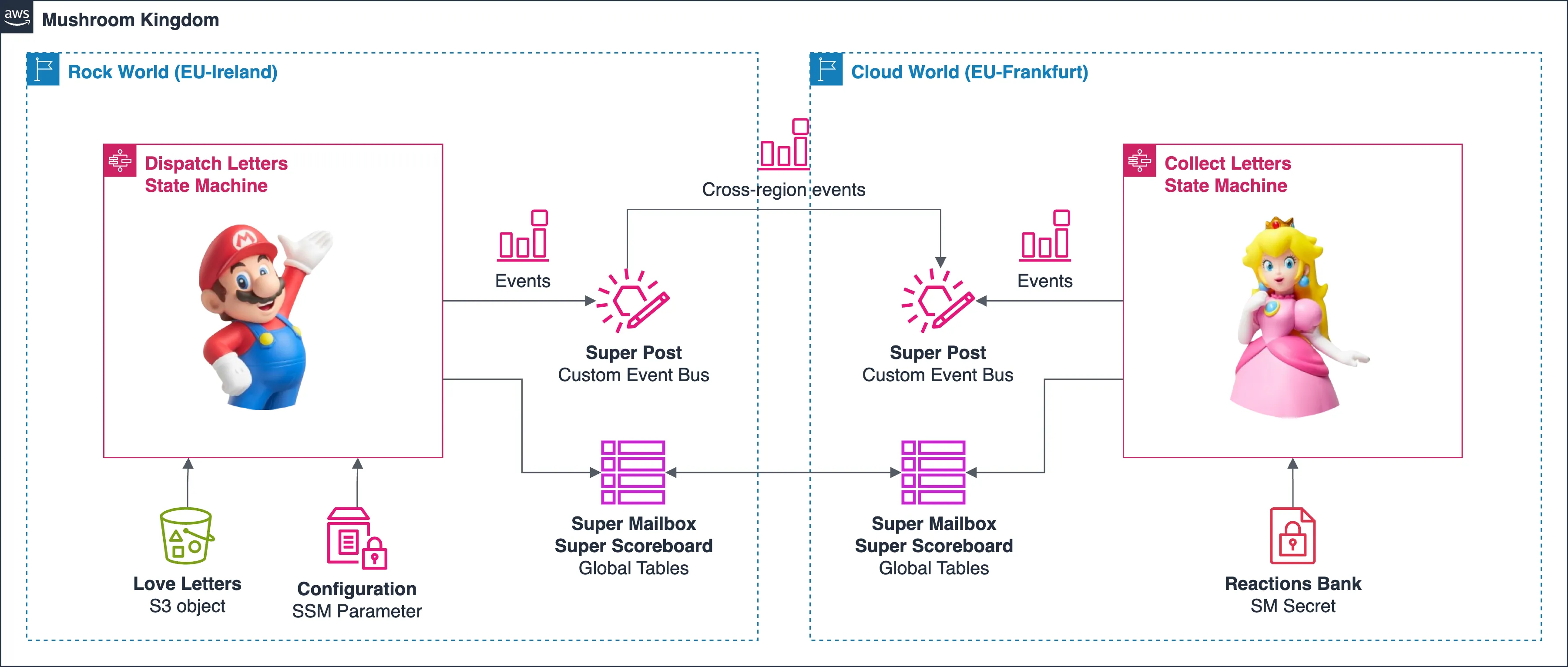
In short, Mario sends bunch of love letters to Peach. She collects them, enriches them with her reactions, and stores them in a secret drawer. We have our Mushroom Kingdom (an AWS account), and Rock & Cloud Worlds (AWS regions). The Super Post is made of AWS EventBridge custom event buses defined in separate regions, to make it more interesting. The core logic of our application is based on two state machines, the AWS Step Functions standard workflows defined in both regions. Then we have DynamoDB global tables, which act as Super Mailbox and Super Scoreboard. Why global tables? The table data is replicated between two regions, so we can interact with same items from both state machines.
This is how it looks like if we wrap it in a nice architectural diagram:
Dispatch Letters (Super Mario)
The first state machine (AWS Step Functions workflow) performs the following actions:
- Gets some configuration from SSM Parameters Store, namely S3 bucket + JSON file containing love letters, which you can find here: superpost-documents.json (I did not write these letters, that was obviously Mario, I only formatted them into JSON array).
- Loads the JSON file from S3 bucket, and creates a map run (a loop) for each of the JSON documents (3x) from the JSON array.
- Validates if the $.documetType is *OVE_LETTER, otherwise it fails the execution.
- Generates new uniqe ID for the letter (based on UUIDv4).
- Adds new items to DynamoDB global table Super Mailbox: 1 letter = 1 item.
- Adds or updates item in DynamoDB global table Super Scoreboard: +1 for each letter sent.
- Creates a new formatted event containing letter data.
- Map collects output from all runs (formatted events).
- Emits multiple (3x) events to regional custom Event Bus.
Here’s the workflow visualization from AWS Step Functions console:

At this time our letters dispatch (workflow execution) finishes. As you’ve noticed, the state machine interacts with few AWS services completely without invoking any Lambda functions. Pretty cool, huh? Let’s see what happens next. Carefully crafted AWS EventBridge event rule catches all events emitted by the workflow, and sends them across to the Cloud World, I mean the other region.
Collect Letters (Princess Peach)
Welcome to the land of Princesses, where yet another event rule triggers the second state machine. It will start multiple executions simultaniously: one for each event, each containing a love letter. The workflow performs followin actions:
- Validates if the $.documetType is LOVE_LETTER, otherwise it fails the execution (Peach does not accept the spam).
- Loads a secret from Secrets Manager, which contains Base64-encoded heart emojis (different heart colors).
- Enriches the letter document with new $.status as COLLECTED and $.reaction as an emoji, for example 💜.
- Updates existing DynamoDB item with new document fields.
- Adds or updates item in DynamoDB global table Super Scoreboard: +1 for each letter collected.
- Emits an event to regional custom event bus.
Here’s the workflow visualization from AWS Step Functions console:

The last action of the workflow emits events to local bus purely for logging purposes. On both regions there are event rules catching all events flowing through custom event buses, to stream the events to AWS CloudWatch Log Groups. A central dashboard in CloudWatch uses Log Insights to visualize the events from both regions, and it looks like this:
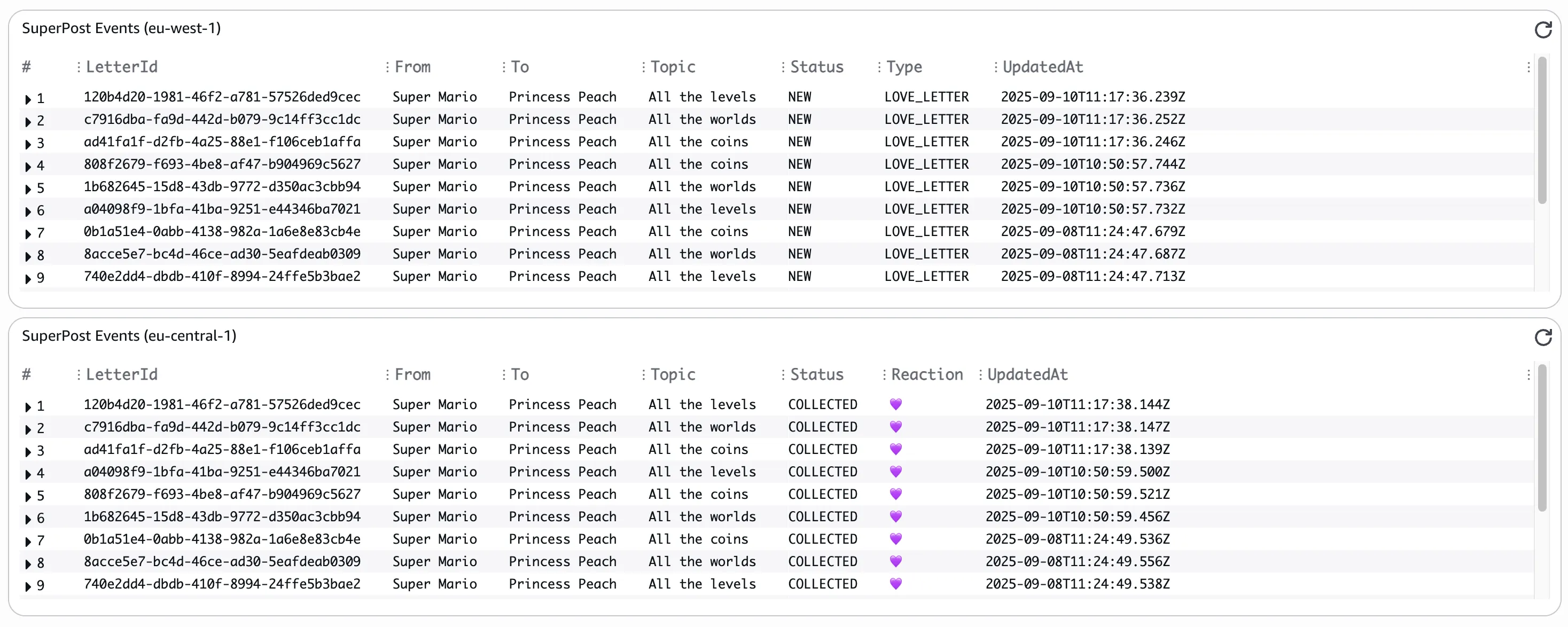
While building this solution I’ve encoded emojis as Base64 to showcase interaction with Secrets Manager and encoding/decoding functions in Amazon State Language (ASL). However, I quickly realized that if you define any emojis inside Amazon State Language, CloudWatch logs, DynamoDB items (and possibly bunch of other data collectors), the emojis are actually displayed on the AWS Management Console.
Gotchas
The functionless model works fine in this case, but I do admit that this is based on very simple workflows. This architecture surely has some limitations, and sooner or later you’ll hit some glass ceiling. So does this model make any sense at all?
- Limitations of ASL: Amazon States Language of the workflows is fine for simple logic, but building any logic representing complex business processes in your organization might be an overkill. Your workflow will become super unreadable, and you might end up with a monolythic state machine (trust me, it’s possible). Of course you can split the logic into smaller workflows, and maybe orchestrate them from a… master workflow? You get the idea. Sooner or later you’ll be back at calling Lambda functions inside your state machine, as it will be easier to cover the custom logic and data manipulation in one of the Lambda’s supported languages.
- Data marshalling: Some services like DynamoDB require transforming JSON data to format consumable by the service. This process is called data marshalling or unmarshalling, and may require additional Lambda functions. In this example I’m relying on relatively flat data structure for my DynamoDB items, and they’re also predictable, so I’m covering the marshalling inside the ASL.
- External libraries: You may need to bundle some additional external libraries, and this will require some custom Lambda functionsa and/or layers. An example of such library could be Prisma ORM for talking to your favorite database engine on RDS.
Key Takeaways
Pure functionless model is definitely feasible, if you just need relatively simple workflows to orchestrate few AWS services, of if the speed is the factor for you (have a look into Step Functions express workflows). This is due to current limitations of the Amazon State Language. However, the ASL is evolving and it’s capabilities will most probably expand over time. AWS Step Functions is definitely one of my favourite services on AWS Cloud.
What I really encourage you to do is to reimagine your serverless applications, especially the ones you’re about to build. Minimize use of custom Lambda functions, and emphasize integrations of native AWS services.
Some of the core design principles you should follow in development of your serverless solutions:
- Single purpose functions: Functions should be compact, short, single-purpose. Split your monolith function’s code into smaller functions, each taking care of specific task only. For example 1 Lambda interacting with data in S3 buckets, another one with data in DynamoDB tables, each following least-privilege model giving corresponding IAM roles access to selected services and resources.
- Orchestration: Orchestrate your application with state machines, not functions. Use AWS SDK integrations to call any AWS service’s API actions directly from Amazon State Language powering your Step Functions workflows.
- Efficient processing: Use events to trigger transactions, enabling asynchronous, just-in-time processing. Make sure you design your event-driven application for event delivery failures and event duplicates.
Demo Time!
If you’d like to play around with this application and see it in action, I’ve got a funky repo for you!
https://github.com/ServerlessNinja/aws-functionless-supermario
The repo contains AWS CDK app in TypeScript, which deploys 3 stacks in 2 regions (defined in cdk.context.json file).
Some useful commands of AWS CDK Toolkit for deploying and trashing the CDK stacks:
# Install all required NPM packages
npm install
# Build the TypeScript project
npm run build
# Synthesize all CDK stacks into CloudFormation templates
cdk synth --all
# Deploy the CDK stacks to your AWS account
cdk deploy --all
# Destroy the CDK stacks from your AWS accounts
cdk destroy --all
To start the execution of the Super Mario Post, you have to manually emit an event to the custom Event Bridge in primary region. On AWS Management Console go to Amazon EventBridge -> Event buses -> Send events. Select SuperPost as event bus, provide SuperPost as source, ImportLetters as detail type, and an empty JSON document as detail: {}. Alternatively, run the following script from command line, which will emit the same event using AWS CLI:
npm run eventYou can follow the DispatchLetters state machine execution and DynamoDB items in primary region, then switch to secondary region to follow execution of CollectLetters state machine and updated items in DynamoDB tables. In few minutes you should also see the events on the CloudWatch dashboard called SuperPost. What if it didn’t start any executions? You probably emitted the event in the wrong region or on the wrong bus (it happens to me quite often, especially during live demos!).
Resources
Super Mario Post (AWS CDK App)
https://github.com/ServerlessNinja/aws-functionless-supermarioLearn how to get started with Step Functions
https://docs.aws.amazon.com/step-functions/latest/dg/getting-started.htmlGetting started with the AWS CDK
https://docs.aws.amazon.com/cdk/v2/guide/getting-started.html
Until our paths cross again in the cloud shadows…
Serverless Ninja © 2023
Super Mario, Princess Peach, and related characters, images, and design elements are © Nintendo. Used here only for non-commercial, educational purposes. Not affiliated with or endorsed by Nintendo.